Console
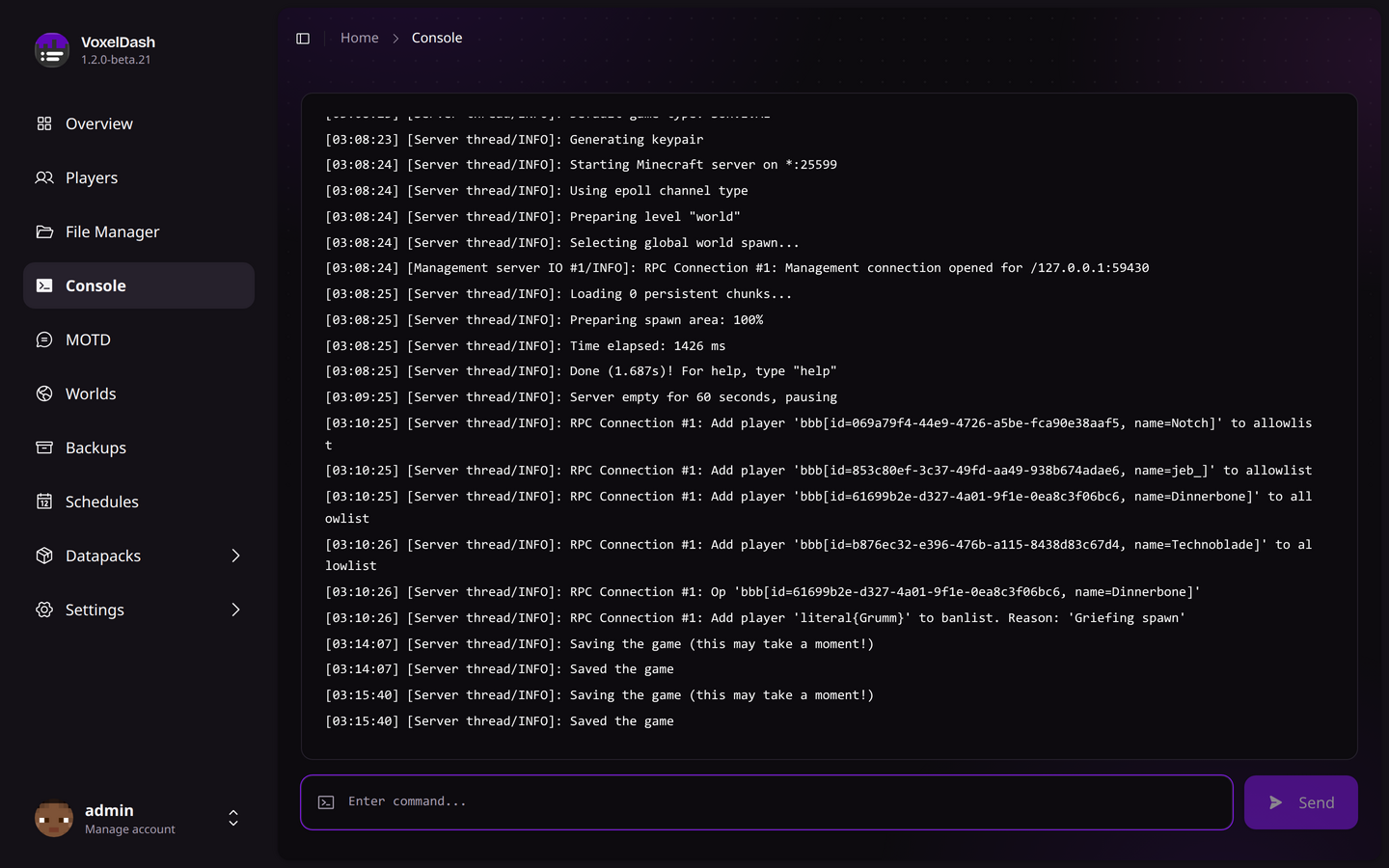
The console module provides full access to your Minecraft server console. Send commands and view real-time server output.
Real-Time Output
The console displays your server's output in real-time using WebSocket connections. You'll see all server messages including:
- Player join/leave notifications
- Chat messages
- Plugin/mod messages
- Server errors and warnings
- Command responses
The console automatically scrolls to show the latest messages. You can scroll up to view older logs.
Sending Commands
To send a command to the server:
- Type your command in the input box at the bottom
- Press Enter or click the Send button
You don't need to include a leading slash (/) when typing commands. VoxelDash will execute them directly on the server console.
Command Examples
Console Features
| Feature | Description |
|---|---|
| Auto-scroll | Automatically follows new messages |
| Copy Text | Select and copy console output |
| Command History | Use up/down arrows to recall previous commands |
| Color Support | Minecraft color codes are rendered properly |
SSH Access
For advanced users, VoxelDash also provides SSH access to the server console. This can be configured in the settings and allows you to connect using any SSH client.
Be careful when running commands that could damage your server. There's no undo for console commands.